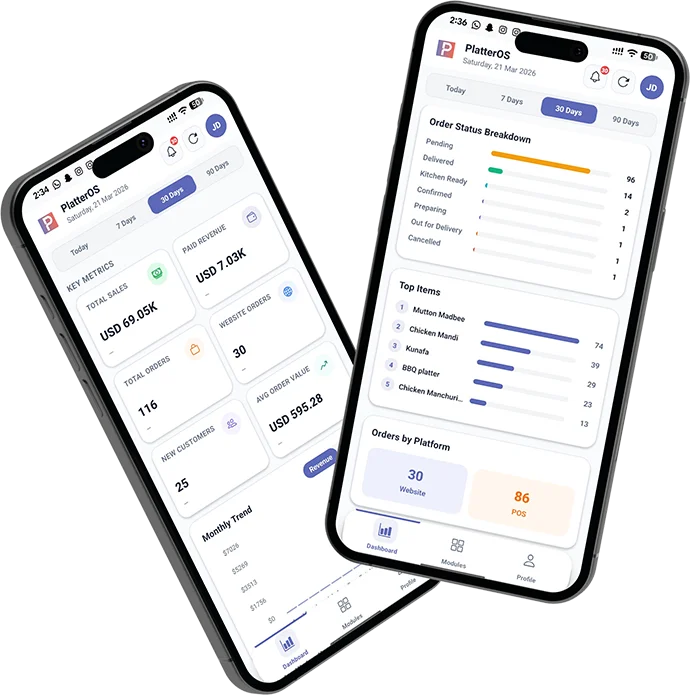
Multi-location restaurant management software helps restaurant groups run consistent operations while giving each location the information it needs to act quickly. The challenge is not simply adding more stores. It is preserving standards, visibility, and accountability as decisions become distributed across managers, regions, and brands.
A process that works through direct owner oversight at one restaurant often becomes fragile at three, ten, or fifty locations. Separate spreadsheets, inconsistent menu data, delayed reports, and location-specific workarounds make it difficult to know what is actually happening. A connected management system creates a reliable operating layer across the group.
Why multi-location restaurant operations become complex
Each new restaurant creates more combinations of staff, vendors, local demand, inventory decisions, promotions, and guest interactions. Leaders need enough standardization to compare performance, but enough flexibility for stores to respond to their market. The right system makes that balance explicit.
- Managers may define the same metric differently.
- Menu prices, modifiers, and availability can drift between locations.
- Inventory items and units may be inconsistent.
- Reports arrive too late for same-week action.
- Permissions become difficult to control as teams grow.
- Successful practices stay trapped inside one store.
- Guest data remains divided across ordering channels and locations.
Nine systems that help restaurant groups scale
1. A shared performance language
Define sales, discounts, voids, labor, food cost, waste, average order value, and other core metrics once. Every dashboard and weekly review should use the same definitions so leaders can compare locations fairly.
2. Central menu and price governance
Groups need controlled menu records with location-level availability and pricing where appropriate. Changes should follow an approval path and leave a clear history. This reduces accidental inconsistency across digital and in-store channels.
3. Connected inventory and purchasing
Shared item definitions, vendor records, recipes, par levels, transfers, and variance reporting make inventory comparable. Our guide to restaurant inventory management software explains the capabilities that matter most.
4. Cross-location analytics
Leaders should be able to move from a group view to a region, location, daypart, product, or order channel without exporting multiple reports. Comparisons should account for context such as store size, opening date, and local operating model.
5. Role-based access
Store managers, regional leaders, finance teams, and owners need different levels of access. Permissions should follow roles instead of being assigned one person at a time, and access should be reviewed when responsibilities change.
6. Repeatable operating playbooks
Important routines—opening, closing, receiving, counting, waste review, incident escalation, and weekly reporting—should have clear owners and standards. Software should support the workflow without turning every task into bureaucracy.
7. Unified guest information
When permitted and handled responsibly, a connected guest view can help restaurant groups understand preferences, visit patterns, feedback, and loyalty across locations. Consent, data protection, and access controls should be designed into the process.
8. Alerts that lead to action
Alerts should identify exceptions: unusual refunds, declining sales, inventory risk, large waste adjustments, or unresolved tasks. Each alert needs an owner, priority, and recommended next step. Otherwise, notification volume becomes another management problem.
9. Mobile access for field leaders
Regional managers should be able to review priority metrics, open issues, and location comparisons while visiting stores. Mobile views must focus on decisions, not reproduce an entire desktop dashboard on a small screen.
A practical rollout plan
Phase 1: establish reliable data
Document the current systems, owners, integrations, and reporting definitions. Clean location, menu, item, vendor, and user records. Choose a small group of metrics that leadership will review consistently.
Phase 2: pilot complete workflows
Select representative locations rather than only the best-performing store. Test a complete operational cycle—from configuration and training through daily use, exception handling, and weekly review. Record where managers still leave the system to complete their work.
Phase 3: scale with standards
Use a documented launch checklist, clear support route, and named location champion. Compare adoption and data quality across stores. Resolve process differences before treating them as software customization requirements.
Phase 4: add intelligent automation
Once the inputs are trusted, add forecasting, recommendations, and exception detection. The principles in our AI restaurant management software guide can help teams evaluate automation responsibly.
Questions to ask before choosing a platform
- Can headquarters manage shared settings while preserving approved local flexibility?
- Which POS, ordering, accounting, payroll, and delivery systems integrate today?
- How are item, menu, guest, and sales records matched across systems?
- Can reports compare locations using consistent definitions?
- How granular are user roles and audit logs?
- What happens when an integration or internet connection is interrupted?
- Can the platform support multiple brands and legal entities?
- How can the business export its data?
- What implementation support and manager training are included?
How PlatterOS supports multi-location restaurant teams
PlatterOS is designed to bring restaurant operations, reporting, inventory, orders, and customer context into one workspace. Owners and operations leaders get a clearer group view, while managers can focus on the information relevant to their location. Explore PlatterOS features and pricing to evaluate the fit for your restaurant group.
Frequently asked questions
When should a restaurant group centralize its systems?
Centralization becomes valuable when teams spend significant time reconciling reports, maintaining duplicate records, or resolving inconsistent processes. It is easier to establish shared standards before expansion accelerates.
Should every location use identical workflows?
Core definitions, controls, and reporting should usually be consistent. Local flexibility may still be appropriate for approved pricing, vendors, menu availability, staffing patterns, and market-specific promotions.
How should success be measured?
Measure both operational outcomes and adoption. Useful indicators include reporting time, count completion, inventory variance, issue resolution time, data quality, manager usage, and location-to-location consistency.
Plan your connected restaurant operation
Book a PlatterOS demo to discuss your locations, systems, and reporting priorities.
Sources: US Small Business Administration growth guidance; National Restaurant Association on restaurant AI.